Rechercher dans ce blog

Voici les notes de publication de la version 4 de Linux.

Lisez-les attentivement,

comme ils vous expliquent de quoi il s'agit, expliquez comment installer le
noyau, et que faire en cas de problème.


QU'EST-CE QUE LINUX?

  Linux est un clone du système d'exploitation Unix, écrit à partir de zéro par
  Linus Torvalds avec l'aide d'une équipe de hackers peu soudée à travers
  le net. Il vise la conformité à POSIX et à la spécification UNIX unique.

  Il a toutes les fonctionnalités que vous attendez d'un Unix moderne à part entière,
  y compris le vrai multitâche, la mémoire virtuelle, les bibliothèques partagées, la demande
  chargement, exécutables de copie sur écriture partagés, bonne gestion de la mémoire,
  et la mise en réseau multipiste, y compris IPv4 et IPv6.

  Il est distribué sous la licence publique générale GNU - voir le
  accompagnant le fichier COPYING pour plus de détails.


SUR QUEL MATÉRIEL FONCTIONNE-T-IL?


  Bien que initialement développé pour les PC 32 bits x86 (i386, i486, P60, P75)

et les clone qui lui ont succéder tel amd486, cyrix486, amd586, cyrix586, amd686, cyrix686, via586, via686, ibm586, ibm686, ou plus). 

Aujourd'hui, Linux fonctionne également sur (au moins) le 

Compaq, Alpha, AXP, DEC, VAX, Sun SPARC et UltraSPARC, Motorola 68000,

AMD x86-64, Intel IA-64, Intel X86, Intel X86 PAE, Cyrix-i586, Cyrix-i686,

PowerPC, PowerPC64, Cell, IBM S / 390, ARM, AXIS CRIS, Hitachi SuperH,

MIPS, HP PA-RISC,

Architectures Xtensa, Tilera TILE, AVR32, ARC et Renesas M32R.


Disable macOS 11 (Big Sur) 'kernel_task' which is throttling the CPU

kernel_task is throttling the CPU

Disable macOS 11 (Big Sur) 'kernel_task' which is throttling the CPU


WARNING ALERT: This ONLY relates to someone who has deleted the IOPlatformPluginFamily.kext in previous versions of macOS to sort the kernel_task overloading the CPU but now after installing macOS 11 (Big Sur) the problem has started again. You will be deleting a system extension and taking a risk... so you have been WARNED! + also best to use version 11.1 upwards, since when testing with 11.0.1 I found it very buggy!

So here is the problem...

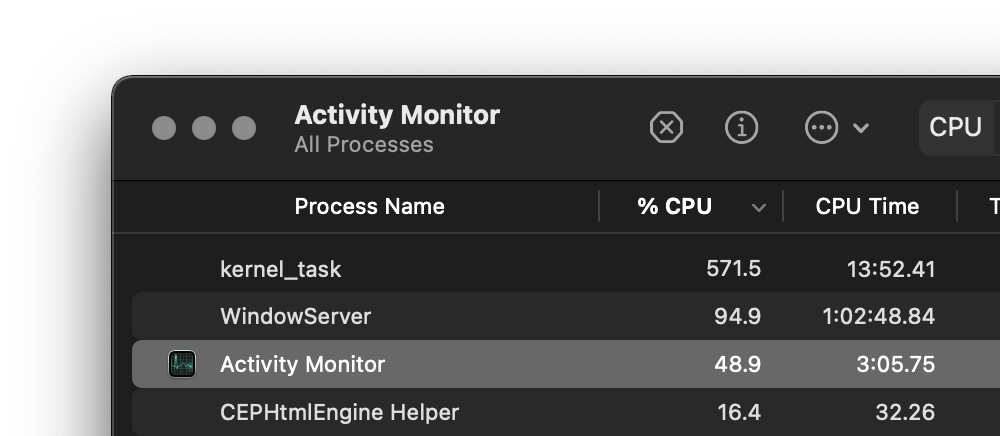
After booting up the MacBook Pro the macOS would be running unbelievably slow. When opening the Activity Monitor to see what was happening with the CPU the thing at the top of the list was the kernel_task using around 500%!

'kernal_task_macOS_fix'

In any of the previous versions - macOS 10.14 (Mojave) or below it was a fairly easy fix by first running recovery mode CMD + R and in the terminal.

csrutil disable

Then running single user mode CMD + S.

fsck -fy

mount -uw /

sudo mkdir /IOPlatformPluginFamily-backup-kexts/

sudo mv /System/Library/Extensions/IOPlatformPluginFamily.kext /IOPlatformPluginFamily-backup-kexts/

sudo rm -rf /System/Library/Extensions/IOPlatformPluginFamily.kext

But from macOS 10.15 (Catalina) onwards this has stopped working. The reason being that Apple introduced the read-only system volume which is a dedicated partition for only storing system content which prevents any tampering with system files which one of them is the troublesome IOPlatformPluginFamily.kext.

Now before finding the solution below which relates to macOS 11 (Big Sur) I had tried making a bootable USB running macOS 10.14 (Mojave) but this couldn't read the read-only system volume.

Step 1 - Disable FileVault

Go to System Preferences -> Security & Privacy and choose the FileVault tab. Then select Turn Off FileVault.

Step 2 - Bypassing the Signed System Volume (SSV*)

SSV helps prevent tampering with any Apple software that is part of the operating system. Additionally, it makes macOS Software Update more reliable and much safer. SSV utilizes APFS snapshots, so if an update cannot be performed, the old system version can be restored without reinstallation.

So this means that macOS Big Sur actually no longer boots from the live system volume but now boots from a snapshot/copy of the same system folder. Normally it's impossible to mount a snapshot as writable, only readable so here is the solution I have found.

So at first bootup in Recovery Mode using CMD + R. On the screen that loads go to the navigation and choose Utilities -> Terminal. Input the following.

NOTE: Without this being done first you won't have permissions to carry out the next csrutil authenticated-root disable command.

csrutil disable

Then.

reboot

Straight away bootup in Recovery Mode again using CMD + R and choose Utilities -> Terminal. Input the following.

csrutil authenticated-root disable

Then.

reboot

Step 3 - Mount the Live Volume and backup the IOPlatformPluginFamily.kext file

Now reboot back into the normal macOS boot mode and let us mount the live volume - the disk1s5 could be different.

NOTE: To find out if 'disks5' is correct for your machine enter diskutil list in the terminal which will list your drives.

diskutil mount disk1s5

Next make it writable which will require you to enter your password - the /Volumes/Macintosh\ HD\ 1 could be different.

sudo mount -uw /Volumes/Macintosh\ HD\ 1

Password:

Now let's first see that the offending IOPlatformPluginFamily.kext file exists by entering.

ls -a /Volumes/Macintosh\ HD\ 1/System/Library/Extensions/

Rather than deleting the file we will do a backup - so use the below and move it to a newly created folder.

sudo mkdir /Volumes/Macintosh\ HD\ 1/IOPlatformPluginFamily-backup-kexts/

sudo mv /Volumes/Macintosh\ HD\ 1/System/Library/Extensions/IOPlatformPluginFamily.kext /Volumes/Macintosh\ HD\ 1/IOPlatformPluginFamily-backup-kexts/

Again see if it has disappeared from the directory.

ls -a /Volumes/Macintosh\ HD\ 1/System/Library/Extensions/

Step 4 - Create snapshot and tag it for the next default reboot.

Now we have deleted the file we need to add this new version of the system folder as a snapshot so enter the following.

sudo /System/Library/Filesystems/apfs.fs/Contents/Resources/apfs_systemsnapshot -s "SnapshotName" -v /Volumes/Macintosh\ HD\ 1

Then tag this as a our default for the next reboot.

sudo /System/Library/Filesystems/apfs.fs/Contents/Resources/apfs_systemsnapshot -r "SnapshotName" -v /Volumes/Macintosh\ HD\ 1

Now fingers crossed you should be able to reboot and the kernel_task should no longer be hogging the CPU as before and in return slowing your machine down.


AS5432

as-block:       AS5377 - AS5535
descr:          RIPE NCC ASN block
remarks:        These AS Numbers are assigned to network operators in the RIPE NCC service region.
mnt-by:         RIPE-NCC-HM-MNT
created:        2018-11-22T15:27:22Z
last-modified:  2018-11-22T15:27:22Z
source:         RIPE

aut-num:        AS5432
as-name:        PROXIMUS-ISP-AS
org:            ORG-BA4-RIPE
admin-c:        BIEC1-RIPE
tech-c:         BIEC1-RIPE
status:         ASSIGNED
member-of:      AS3320:AS-AUTH-PILOT-ROUTEPRIO-FROM-AS3303
abuse-c:        BIAC1-RIPE
mnt-by:         RIPE-NCC-END-MNT
remarks:        -------------------------------------------------
remarks:        For peering @ BNIX , please contact peering@skynet.be
remarks:        --------------------------------------------------
remarks:        Network problems to: noc@skynet.be
remarks:        Abuse notifications to: abuse@proximus.com
remarks:        --------------------------------------------------
mnt-by:         SKYNETBE-MNT
created:        2002-09-10T14:42:40Z
last-modified:  2020-03-04T06:25:55Z
source:         RIPE
abuse-email:    abuse@proximus.com
abuse-c:        BIAC1-RIPE
abuse-org:      ORG-BA4-RIPE

organisation:   ORG-BA4-RIPE
org-name:       Proximus NV
country:        BE
org-type:       LIR
address:        Koning AlbertII-laan 27
address:        1030
address:        Brussels
address:        BELGIUM
phone:          +32 2 514 43 66
e-mail:         ip-experteam@belgacom.be
admin-c:        SVdS1-RIPE
admin-c:        MN1190-RIPE
admin-c:        KB905-RIPE
admin-c:        PD756-RIPE
abuse-c:        BIAC1-RIPE
mnt-ref:        RIPE-NCC-HM-MNT
mnt-ref:        SKYNETBE-MNT
mnt-by:         RIPE-NCC-HM-MNT
mnt-by:         SKYNETBE-MNT
created:        2004-04-17T11:00:05Z
last-modified:  2020-12-16T13:36:07Z
source:         RIPE

role:           Belgacom Internet Expertise Center
address:        Proximus SA de droit public
address:        Network Engineering & Operations
address:        Boulevard du Roi Albert II, 27
address:        B-1030 Bruxelles
address:        Belgium
phone:          +32 2 202-4111
abuse-mailbox:  abuse@proximus.com
e-mail:         noc@skynet.be
e-mail:         cops@belgacom.be
e-mail:         mailadmin@skynet.be
admin-c:        MN1190-RIPE
tech-c:         SVDS1-RIPE
tech-c:         PD756-RIPE
tech-c:         KB905-RIPE
nic-hdl:        BIEC1-RIPE
remarks:        -------------------------------------------
remarks:        Network problems to: noc@skynet.be
remarks:        Peering requests to: peering@skynet.be
remarks:        Abuse notifications to: abuse@belgacom.be
remarks:        abuse requests sent to another address
remarks:        will be ignored.
remarks:        -------------------------------------------
notify:         noc@skynet.be
mnt-by:         SKYNETBE-MNT
created:        2004-08-06T09:18:56Z
last-modified:  2019-12-17T08:58:50Z
source:         RIPE